Galpon Spring: A Fresh Take on Layered Lettering for Modern Creators
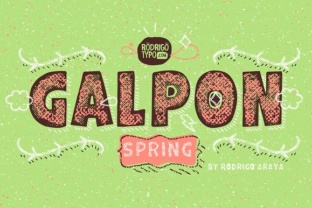
If you have ever tried to give your text some depth or a pop of color, you know it can be a clunky process. Offsetting duplicate text layers, guessing alignments, and wrestling with blending modes often eats up time that you would rather spend on the creative part. Galpon Spring steps in as a refined version of the Galpon family, built specifically to make layered typography effortless and repeatable. It is a font system designed to be stacked — each layer sits perfectly on top of the previous one so you can build unique lettering without the manual tweaking.
Think of it as a ready‑to‑use toolkit for creating dimensional, colorful headlines, logos, and decorative text. Whether you are putting together a quick social media graphic or polishing a product label, Galpon Spring gives you the control to shape exactly how thick, textured, or shadowy your letters look.
Where Galpon Spring Fits Into Real Projects
The real value of this font family shows up when you start using it in everyday work instead of just admiring its design. Because each layer is a separate font file (or style within a variable version), you can assign different colors, opacities, and effects to each piece. That means you can produce a multi‑color headline in seconds without duplicating a text box and manually nudging it over.
Social Media Graphics That Stand Out
If you run an Instagram account for your small business, you know the feed is crowded. A simple black‑on‑white quote rarely gets a second look. With Galpon Spring, you can take a single word and give it an outer shadow, an inner highlight, and a solid core — all from one text layer per piece. For example, on a promotional post for a weekend sale, you could use the Spring Outline layer in white, the Spring Fill in your brand color, and the Spring Shadow in a darker shade underneath. The result looks like you spent ten minutes in Photoshop, but you did it directly inside Canva or Illustrator.
Logo Concepts on a Budget
Freelancers and small business owners often need a logo that feels polished without hiring a designer. Galpon Spring lets you build a distinctive wordmark by mixing and matching layers. Try using only the Fill and Inline layers for a clean, engraved look. Or go bold with the Fill, Shadow, and an extra Highlight layer for a neon‑sign effect. You can test five variations in the time it normally takes to align two text boxes. Because the layers are designed to fit together, you avoid the common frustration of misaligned strokes and gaps.
Print Materials That Feel Premium
Printed pieces like flyers, business cards, and product packaging rely on depth to catch the eye. But print often requires spot colors or foil stamping, which can be expensive. Galpon Spring gives you a way to simulate multi‑layer designs digitally, and if you do end up printing, the layered approach translates well to silk‑screening or vinyl cutting. A local coffee shop owner, for instance, could use Galpon Spring for bag labels: the Fill layer in kraft paper brown, a white Outline layer for contrast, and a subtle Shadow layer to lift the text off the package. No extra design fees.
Practical Scenarios for Different Users
Every creator has a slightly different workflow, but Galpon Spring fits a surprising number of them because it does not require advanced software skills. You can load the fonts into any standard design tool — Photoshop, Illustrator, Affinity, Canva, Figma, even Microsoft Publisher — and start layering right away.
- Bloggers and content creators can use the layered system to build consistent headers for their website or YouTube thumbnails. Instead of designing a new graphic each time, they simply type the title in the same Galpon Spring layers and export. The brand stays recognizable, and the process stays fast.
- Educators and course developers often need to print worksheets or slide decks that grab attention. A layered title like “Week 3: Photosynthesis” in Galpon Spring (Fill + Outline) makes the page feel lively without adding distracting clipart.
- Hobbyists making stickers or decals appreciate that each layer can be cut separately if they use a Cricut or Silhouette machine. The Fill layer becomes the base color, the Outline layer becomes a border, and the Shadow layer adds a drop shadow — all from a single font family.
- Marketers running A/B tests on email headers or landing pages can quickly produce two versions: one with a plain font and one with Galpon Spring layers. The layered version often leads to higher click‑through rates simply because it looks more intentional.
What You Should Consider Before Using Galpon Spring
Like any design tool, this font family works best when you understand how to manage its parts. The layered system means you will have multiple font files or styles installed. If you are new to stacking fonts, start with just two layers — Fill and Shadow — and experiment. Adding too many layers at once can make the letters feel heavy or muddy, especially at small sizes.
- Reading distance matters. For a large poster headline, you can use four or five layers and the letters will still read clearly. For a business card or a tiny label, stick to two layers (maybe Fill and Outline) so the details do not get lost.
- Color contrast is critical. The beauty of layers is that you can assign any color to each piece. But if the Shadow layer is too similar to the Fill, the depth disappears. Use a color wheel or a contrast checker to keep each layer distinct.
- Licensing for commercial use. Check the specific license for Galpon Spring. Most font families allow you to use them in client projects and products sold, but you may need an extended license if you are embedding the font in an app or converting to a logo for resale. Always read the terms before you start a client job.
- Software limitations. Some free design tools (like Canva’s free tier) do not let you load custom fonts, so you may need to install the layers manually in a desktop app. If you work mostly online, consider tools like Figma or Adobe Express that support custom typefaces.
How the Layer System Saves Time and Reduces Rework
The biggest selling point of Galpon Spring is not the pretty letters — it is the elimination of manual offsetting. When you type the same word in three separate text boxes and try to align them by eye, you inevitably end up with a pixel of misalignment that forces you to zoom in and nudge. With pre‑matched layers, each font file is crafted to sit exactly where it needs to go. You simply type the word once, duplicate the text layer, change the font to a different Galpon Spring style, and move on.
This precision becomes a huge time‑saver when you are working on a project with many pages or social media posts. For example, a freelancer designing a 20‑page brochure can create a master style that uses Galpon Spring for all section headers. If the client decides later that they want a different color for the shadow, you change it in one place and every header updates automatically. No manual re‑positioning.
Realistic Outcomes You Can Expect
Does using Galpon Spring guarantee that your design will look professional? Not by itself — the content and composition still matter. But it does give you a consistent, high‑quality base that is hard to achieve with standard fonts. The layered approach naturally adds visual interest, making your text feel like a crafted element rather than a generic title.
For a small business owner, this often means higher engagement on social posts and a more cohesive brand presence across platforms. For a hobbyist, it means turning a simple quote into a shareable piece of art. For a marketer, it means faster iteration and less time spent on tedious alignment tasks.
Galpon Spring is especially useful when you want to create a custom look without learning a full design app. Because the layers are part of the font itself, you are essentially getting a shortcut to effects that used to require manual masking and offsetting. That frees you up to focus on the message, the audience, and the overall layout.
Final Thoughts Before You Download
Before you add Galpon Spring to your toolkit, think about the types of projects you handle most often. If you frequently create text‑heavy graphics where the words need to pop, this family will pay for itself in saved time. If you mostly write long paragraphs, the layered system may not be as useful — though you can still use the base Fill layer as a clean sans‑serif for body text.
Also consider the file format. Many layered font families come as separate OTF or TTF files for each layer. Check whether Galpon Spring offers a variable font version that allows you to control layer weight and position from a single file. That flexibility can simplify your workflow even further.
Ultimately, Galpon Spring is a practical tool designed for real people who want to produce better-looking text without jumping through hoops. Whether you are a seasoned designer looking for a new go‑to family or a business owner trying to keep your brand consistent across a dozen channels, the layered approach gives you a head start. And because it is part of the Galpon lineage, you know each letterform has been drawn with care — no awkward spacing, no unstable curves.
Try it on a small project first. Take one word, apply three layers, and see how quickly it transforms a flat sentence into something with depth and personality. That is the real test, and it usually takes less than a minute.