Undercoat: A Gritty, Hand-Painted Helvetica for Grounded Design Workflows
Typography often walks a line between precision and personality. Helvetica has long been the go-to for clean, neutral communication, but sometimes a project calls for something with more texture—something that feels lived in. Undercoat answers that need. It is a complete reimagining of the Helvetica skeleton, but every character was hand-painted rather than digitally constructed. That single choice transforms the typeface from a sterile tool into an organic centerpiece for grungy, tactile design applications.
If you work with brand identities, posters, album art, editorial layouts, or any creative project where authenticity matters, Undercoat offers a way to introduce warmth and imperfection without losing the readability that Helvetica’s structure provides. This article walks through what Undercoat is, how it fits into real creative processes, and practical ways to integrate it into your own workflow.
What Makes Undercoat Different
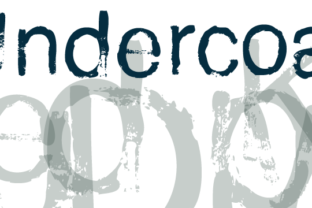
At its core, Undercoat starts with the proportions and spacing of Helvetica. That means it works well for body text and headlines where legibility is non-negotiable. But instead of uniform vector paths, each letterform carries the marks of a brush, uneven edges, varying stroke widths, and subtle ink bleeds. The result is a typeface that looks like it was stamped, brushed, or rolled onto a rough surface.
This handmade quality makes Undercoat useful for designers who want the reliability of a classic sans-serif but need the visual grit that comes from real-world application. It sits comfortably between a clean font and a distressed texture, giving you the best of both worlds.
Because it was hand-painted, no two characters are perfectly identical in weight or curve. That inconsistency is actually the point—it brings a human touch into a digital layout, something that’s increasingly valuable as audiences become more skeptical of overly polished, corporate visuals.
Where Undercoat Fits in a Design Process
Every project goes through phases: discovery, concept development, production, refinement, and delivery. Undercoat can be introduced at different points depending on the mood and goals of the work.
Early Concept Development
When you’re still exploring mood boards and visual direction, Undercoat can help set the tone. Try dropping it into a headline alongside reference imagery—concrete textures, aged paper, worn signage. Because the font already carries a grungy character, it can clarify whether the project will lean into a raw, urban, or vintage aesthetic. You’re not just imagining the feel; you’re seeing it in the type.
Mid-Project Production
For projects that have already chosen Helvetica or a similar sans-serif for body copy, Undercoat can be layered in as a display option. Headlines, pull quotes, or section titles set in Undercoat create contrast without breaking the overall typographic system. The spacing and letterforms remain familiar, so the reader doesn’t feel a cognitive jolt, but the visual texture signals a shift in atmosphere.
Final Refinement and Polish
Sometimes a layout feels too clean, too sterile. Undercoat works well in the final stage as a texturizing element. Applying it to a single word or phrase—a brand tagline, a chapter heading—can give the whole piece a sense of materiality. Pair it with subtle paper textures or slight offsets in the background to reinforce the hand-drawn feel.
Practical Ways to Integrate Undercoat
Integrating any new font into a workflow requires more than just installing the file. You need to consider hierarchy, legibility at different sizes, and how it interacts with other visual elements. Below are concrete approaches for making Undercoat work in real projects.
Pair It With Neutral Modern Fonts
Because Undercoat carries a lot of personality, it works best when balanced by cleaner, simpler typefaces. A common workflow is to use Undercoat for headlines and a standard sans-serif like Inter, Work Sans, or a lighter weight of Helvetica itself for body copy. The contrast highlights the grit of Undercoat while keeping long-form text easy to read.
- Headlines: Undercoat in sizes 36px and above to let the hand-painted details show.
- Subheadings: A clean sans-serif at a medium weight to bridge the visual gap.
- Body: A thin or regular weight of the same sans-serif for comfortable reading.
Layer It Over Textures
Undercoat was designed to look painted, so it resonates strongly when placed on backgrounds that feel physical. Try it on concrete, brick, or wood grain textures—or even on a subtle noise overlay. For digital usage, a low-opacity noise or grain layer beneath the text can simulate the surface interaction that the font implies.
Use Color to Enhance the Grit
Because Undercoat has irregular edges, it interacts differently with color than a vector font. A slightly off-white or cream on a dark background can mimic ink on paper. For screen-based projects, try muted earthy tones—rust, slate, olive—rather than pure black and white. The uneven stroke edges catch light in a more natural way.
Workflow Examples Across Different Roles
The following scenarios show how Undercoat can be dropped into different workflows without major disruption.
For Branding and Identity Design
A small coffee roastery wants a logo that feels artisanal but still professional. Using Undercoat for the shop name in a warm cream on a deep brown background gives an immediate sense of handcrafted quality. Pair it with a clean sans-serif for the tagline and contact info. The logo retains a modern structure but looks like it was painted on the side of a building.
For Editorial and Publishing
A zine about urban exploration needs a gritty, unpolished look. Undercoat works for chapter titles and drop caps. The rest of the article body remains in a readable serif or sans-serif, but the headings bring the zine’s tactile personality forward. Because Undercoat is hand-painted, it aligns with the theme of decay and discovery without becoming illegible.
For Digital Products and Web Design
You might be building a landing page for a band or a creative agency that wants to stand out. Use Undercoat for the main hero headline. Since it’s a web font or you can embed it as a custom typeface, it loads like any other font, but the visual weight is far more distinctive. Make sure to set a generous line height and letter spacing to accommodate the irregular edges, especially on screens.
Factors to Consider Before Implementation
Undercoat is powerful, but like any tool, it has conditions where it works best. Keep these points in mind when planning your use.
- Legibility at small sizes: Because the strokes vary and edges are uneven, avoid using Undercoat below 14px for body text. It’s primarily a display font. For small labels or captions, use a cleaner companion typeface.
- Compatibility with existing brand systems: If your brand identity relies on pristine, sharp lines, Undercoat will clash. It’s best suited for identities that embrace imperfection, heritage, or subcultural aesthetics.
- File format and embedding: Make sure you have the correct font license for commercial work. Undercoat may be available in OTF, TTF, WOFF, or variable versions depending on where you acquire it. For web usage, use WOFF2 for best performance.
- Quality control in print: When printing, Undercoat’s rough edges pair well with uncoated paper and matte finishes. Avoid high-gloss coatings that might trivialize the handmade effect. Run a test print at actual size to see how the ink holds.
Long-Term Use and Building a System
The best font choices don’t just solve one project—they become part of a reusable toolkit. If you anticipate needing a grunge or hand-painted aesthetic across multiple projects, Undercoat can anchor a style guide for future work.
- Create a typography system: Document which sizes, colors, and background textures you used with Undercoat. Include pairing examples so the next designer or developer can apply it consistently.
- Combine with other handmade assets: Since Undercoat was hand-painted, it works naturally with other organic elements—drawn icons, ink splatters, scanned textures, and imperfect borders. This can form a cohesive visual language.
- Revisit and refine: Over time, you may find that Undercoat works better in certain roles. Maybe it becomes your go-to for large display quotes but not for full paragraphs. That’s fine—keep it in your rotation and test it against new contexts.
Key Takeaways for Creatives
Undercoat is more than a font; it’s a design choice that signals authenticity, texture, and a departure from sterile digital perfection. Its hand-painted roots give you an organic centerpiece that still follows the highly readable structure of Helvetica, making it practical for real workflows.
- It fits into discovery, production, and refinement phases of any project.
- Pair it with clean, neutral typefaces to balance its personality.
- Use it at larger sizes to preserve its detail and legibility.
- Apply it over textured backgrounds and with muted color palettes for best effect.
- Document your usage for long-term consistency across multiple projects.
If your work demands a font that feels like it was pressed onto paper or painted onto a wall, Undercoat gives you that presence without sacrificing readability. It bridges the gap between a classic typographic structure and an expressionistic, hand-driven finish. That’s a rare combination, and one worth exploring in your next project.