The Clouds: A Playful Font That Brings Warmth to Everyday Design
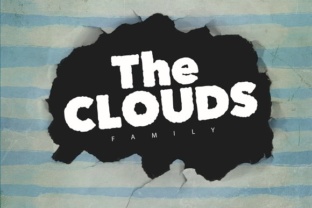
Typography can feel like a thankless background player, until you stumble across a typeface that makes you stop and smile. The Clouds, designed by Pere Esquerrà, is exactly that kind of font. It’s quirky, rounded, and undeniably playful—the kind of lettering that looks like it was shaped from soft cotton or whipped cream. But don’t let the whimsical appearance fool you. This font isn’t just a novelty; it’s a practical tool for anyone who wants to add warmth, personality, and a touch of levity to their work.
What Exactly Is The Clouds?
At its core, The Clouds is a display typeface built around bubbly, cloud-like forms. Each character feels soft and chunky, with curves that avoid sharp angles. Pere Esquerrà designed it to evoke a sense of lightness and joy, making it stand out in a world of sterile sans-serifs and rigid geometric fonts. While it looks simple, there’s thoughtful construction behind the shapes: the proportions are balanced, the spacing is generous, and the overall effect feels organic rather than forced. This isn’t a font you’d use for a legal contract, but that’s not its purpose. It’s built for moments when you want to grab attention and create a friendly, approachable atmosphere.
Where The Clouds Shines in Everyday Use
The real magic of The Clouds is how it adapts to different contexts without losing its personality. Here are some of the most realistic and effective ways people use it.
Social Media Graphics That Stop the Scroll
If you manage social media accounts—whether for a personal brand, a small business, or a side project—you know how hard it is to get people to pause. The Clouds works especially well for short, punchy quotes, announcements, or call‑to‑action text on Instagram Stories and static posts. A lifestyle blogger might use it for a “Sunday Reset” checklist, while a freelancer could introduce their new offer with a headline like “Your Brand, But Cozier.” The font’s roundness softens the message, making it feel more like a friendly nudge than a sales pitch. Pair it with pastel backgrounds or nature photos, and the content instantly feels more inviting.
Personal Projects and Crafting
Hobbyists and DIY enthusiasts often reach for The Clouds when they want to infuse a handmade feel into digital work. Invitations, greeting cards, scrapbook titles, and even print‑and‑color pages benefit from its playful letterforms. For example, a parent designing a birthday invitation for a child’s party could use the font for “You’re Invited!” and then transition to a cleaner sans‑serif for the details. The contrast keeps things interesting while maintaining a coherent theme. Artists creating digital stickers or planners also find it useful—the font adds character to planners, habit trackers, and vision boards without looking overly commercial.
Classroom and Educational Materials
Teachers and educators at all levels look for ways to make learning materials feel less intimidating. The Clouds works beautifully for bulletin board headers, name tags, reading corner signs, and worksheet titles. A kindergarten teacher might use it for “Story Time” or “Math Fun,” while a high school English teacher could use it sparingly for project instructions. The key is to use it as an accent rather than body text. Because it’s so distinctive, it signals to students that this piece of content is meant to be engaging, not just informational. It also works well for homeschool resources, online course modules, and printable educational games.
Small Business Branding with Personality
Small businesses that rely on a friendly, approachable image can leverage The Clouds to stand out from competitors. A neighborhood coffee shop might use it on their chalkboard specials menu or their to‑go cups. A boutique that sells handmade candles could feature it on product labels for scent names like “Lavender Dream” or “Vanilla Hug.” A creative agency might use it sparingly in their logo or website hero section—just enough to signal that their process isn’t stiff or corporate. The visual warmth of the font translates into an emotional perception: this business cares about the little things, and it wants to make you feel comfortable.
Digital Content and Blog Headings
Bloggers, newsletter writers, and content creators often struggle with making their headlines pop without resorting to heavy, loud typefaces. The Clouds offers a lighter alternative. It works wonderfully for section headers inside blog posts—especially for lifestyle, parenting, wellness, or creativity niches. Consider a post titled “How to Make Mornings Less Hectic.” Using the font for the H2 “A Simple Routine That Works” adds a gentle visual break that invites readers to keep scrolling. It also pairs well with monoline sans‑serifs, creating a contrast that feels intentional and modern. Just keep the body text simple to avoid visual clutter.
Who Benefits Most from The Clouds
While the font is flexible, certain types of users get the most out of it. Creators and entrepreneurs appreciate how it helps them build a distinctive brand voice without hiring a designer. Marketers use it to inject personality into landing pages and promotional graphics. Bloggers find it useful for making their content feel less formal. Educators rely on it to soften classroom materials. Freelancers use it in client proposals or mood boards to show a more human side. Hobbyists simply enjoy experimenting with it for fun projects. The font lowers the barrier to creating visually appealing layouts—you don’t need deep design skills to make it look good.
Even publishers and small business owners who aren’t designers can benefit. If you run an Etsy shop or sell digital products, using The Clouds in your thumbnails or listing images can make your offerings feel more approachable. It creates an instant emotional connection that sterile stock fonts rarely achieve.
Practical Considerations Before Using The Clouds
No font is perfect for every situation, and The Clouds has some quirks worth noting. The biggest concern is legibility at small sizes. Because the letterforms are chunky and rounded, they can become muddy when scaled down below 14–16 pixels. Avoid using it for long paragraphs, dense body text, or anywhere that requires quick scanning. Instead, reserve it for headlines, short phrases, and accent text.
Pairing matters. The font works best when balanced with a clean, neutral counterpart—think a light sans‑serif like Lato, Open Sans, or Montserrat. The contrast between the bouncy display font and a steady body font keeps the design readable while preserving the playful vibe. Also, consider the context. A formal business report or a legal document would be a poor match. Similarly, if your audience skews conservative or professional (like law or finance), the font might feel out of place. But for creative industries, education, lifestyle, and personal projects, it’s a natural fit.
Another practical tip: use it sparingly. A full page of The Clouds can feel overwhelming, like a room full of smiling clowns. Use it for one or two focal points—a main heading, a button, a callout—and let the rest of the design breathe. Moderation preserves the charm.
Real Outcomes: How The Clouds Changes the Feel of Your Work
Imagine a local bakery that used to have a plain, generic menu board. Switching to The Clouds for item names like “Blueberry Morning Muffin” or “Honey Lavender Latte” instantly made the board feel warmer and more personal. Customers started commenting on how “cute” the menu looked, and that positive impression carried over to their perception of the food. The font didn’t just decorate—it helped build an emotional connection.
Or consider a freelance writer who used The Clouds on the headline of her portfolio site. The playful type made visitors curious about her personality, and several clients mentioned they hired her because her site felt “genuine and not stuffy.” That’s a concrete result from a typography choice.
For educators, the effect is subtler but equally real. A second‑grade teacher printed reading logs using the font for the title “My Reading Journey.” Students were more motivated to fill them out because the form itself felt less like an assignment and more like a game. Small design choices ripple into behavioral outcomes.
Bringing It All Together
The Clouds is more than a decorative afterthought—it’s a deliberate tool for communication. When you choose it, you’re signaling that your content is approachable, human, and open. Whether you’re a creator building a brand, a teacher making lessons feel lighter, or a small business owner looking to soften your image, this font delivers results without needing a heavy design budget. The key is knowing when and where to use it: short pieces, prominent positions, and with plenty of breathing room.
Next time you sit down to design a social post, a flyer, or a classroom handout, ask yourself what feeling you want people to walk away with. If the answer includes “warm,” “friendly,” or “delightful,” then give The Clouds a try. It might just be the playful nudge your content needs to truly connect.