Consequences: A Free Display Font Worth Understanding Before You Use It
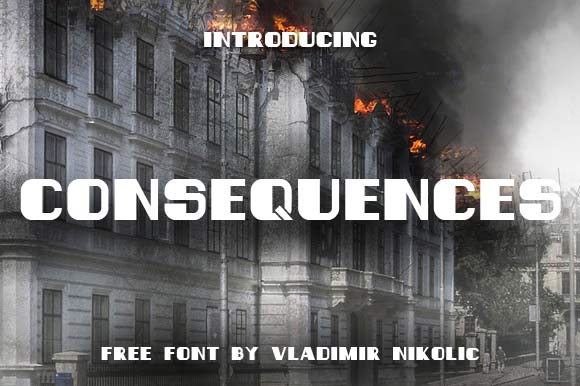
If you have browsed free font libraries lately, you have likely come across Consequences—a display font created by Vladimir Nikolic that stands out for its raw, hand-drawn character. At first glance, it is easy to see why designers, marketers, and hobbyists are drawn to it. The uneven strokes, slight distress, and organic rhythm give it a personality that many polished fonts lack. But like any tool with a strong voice, Consequences can work beautifully or fall flat depending on how you use it. The difference between a memorable design and a messy one often comes down to a few avoidable mistakes.
What Consequences Actually Is
Consequences is a free display font built for impact. It is not a neutral workhorse typeface. Its irregular letterforms and textured edges are meant for headlines, posters, logos, packaging, and other short-form applications where character matters more than pure legibility. Vladimir Nikolic designed it with a handcrafted feel—think marker on rough paper rather than precision vector curves. That deliberate imperfection is its strength, but it also means Consequences demands thoughtful handling. Many people who download it expect it to behave like a standard sans serif or a clean script, and that mismatch sets them up for disappointment.
Mistake One: Using Consequences Where Readability Is Critical
The most common error I see is treating Consequences as an all-purpose font. Someone designs a flyer, drops it into a body paragraph at 12 points, and wonders why the text looks muddy and hard to read. Consequences is a display font. It is not designed for long passages or small sizes. The very features that give it personality—uneven stroke widths, rough edges, irregular spacing—become liabilities when you scale it down.
If you need a friendly, approachable font for body copy, pair Consequences with a clean, readable companion like Open Sans, Lato, or Roboto. Reserve Consequences for the headline or a short pull quote. That way you get the character without sacrificing readability. I have seen designers salvage a whole layout simply by shrinking the text block and letting Consequences do the heavy lifting in a single, well-placed line.
Mistake Two: Ignoring Spacing and Kerning Adjustments
Free display fonts often ship with default spacing that works well for the designer's original demo but not for your specific project. Consequences is no exception. The kerning pairs may be loose in some places and tight in others, especially around letters like A, V, W, and Y. If you drop the font straight into your design without adjusting tracking or kerning, you can end up with awkward gaps or collisions that ruin the handcrafted illusion.
Take a few extra minutes to manually adjust spacing for your headline or logo. In most design software, you can select the entire text and tweak the tracking slightly—usually a small negative adjustment tightens the overall feel without losing the organic quality. For specific problem pairs, use manual kerning. This step alone can elevate a decent design to a polished one. I have seen a logo go from amateur to professional simply by closing the gap between the T and the H in The Consequences.
Mistake Three: Overlooking the Font's Context and Tone
Consequences has a rugged, slightly rebellious tone. It evokes hand-lettered signage, punk flyers, indie zines, and artisanal packaging. That is not the right voice for every brand or message. Using it for a corporate memo, a medical brochure, or a financial report would feel jarring. People sometimes fall in love with the aesthetic and force it into places where it undermines the message.
Before you commit, ask yourself: Does this font match the emotional tone I need? If you are promoting a craft brewery, a music festival, or a creative workshop, Consequences can be a perfect fit. If you are announcing a tax deadline or a legal notice, choose something more neutral. Matching tone to purpose is not about limiting creativity—it is about respecting the reader's expectations.
Mistake Four: Downloading from Untrusted Sources
Because Consequences is free, it appears on dozens of font sites, some of which are reliable and some of which are not. Downloading from an unofficial source can get you a corrupted file, a version with altered spacing, or even malware disguised as a font. Even if the file works, you might miss out on updates, alternate glyphs, or the correct license terms.
Always download Consequences directly from Vladimir Nikolic's official portfolio or a reputable font library that credits the designer. This ensures you get the authentic version, with the proper letterforms and the intended license. If you are unsure, check the designer's website or a trusted platform like Font Squirrel, DaFont (with caution), or Behance. Spending five minutes verifying the source saves you hours of troubleshooting later.
Mistake Five: Not Checking License Terms Before Commercial Use
Free does not always mean free for everything. Some free fonts are only free for personal projects. Others allow commercial use but require attribution. Consequences by Vladimir Nikolic is generally offered for free use, but the specific license may vary depending on where you download it. If you are designing for a client, a product, or any paid work, you need to confirm the terms.
Contact the designer directly if the license is unclear. Most type designers are approachable and appreciate the courtesy. A quick email can save you a legal headache later. I have seen projects delayed because someone assumed a font was free for commercial use and it was not. Do not assume—verify.
Mistake Six: Overusing Consequences in a Single Layout
Because Consequences is visually strong, there is a temptation to use it everywhere: headline, subhead, caption, button text, even the legal disclaimer. That much personality in one layout creates visual noise. The eye has no place to rest. Instead, use Consequences sparingly. Let it be the accent, not the entire conversation.
A better approach is to establish a clear hierarchy. Use Consequences for the main headline. Choose a simpler sans serif for subheads and body text. You can also use Consequences for a single word or phrase that you want to emphasize—like a product name or a call to action. The font's impact grows when it appears less frequently.
Mistake Seven: Forgetting to Test Across Mediums
How Consequences looks on your screen at 100% zoom may not be how it looks on a printed poster, a mobile screen, or a social media thumbnail. Display fonts with rough edges can lose detail when printed at small sizes or on low-resolution paper. They can also appear too busy on a cluttered background.
Always test Consequences in the medium where it will be seen. Print a proof at full size. View it on a phone and a tablet. Check how it reads from a distance. If the texture overwhelms the message, you may need to adjust the size, add more spacing, or choose a slightly cleaner variant. A little testing upfront prevents a costly reprint or a digital campaign that users scroll past.
How to Use Consequences Well
When you avoid these common missteps, Consequences becomes a powerful tool. Here is a quick checklist to keep you on track:
- Use it for short, impactful text—headlines, logos, posters, labels, and short quotes.
- Pair it with a clean, neutral font for body copy and supporting text.
- Adjust spacing manually to achieve a balanced, intentional look.
- Match tone—choose Consequences for projects with a handcrafted, edgy, or organic feel.
- Download from the official source to ensure file integrity and correct licensing.
- Confirm commercial terms before using it in client or paid work.
- Test across devices and print to make sure the font performs as expected.
Consequences, like any good display font, rewards attention to detail. It is not a set-it-and-forget-it typeface. But when you invest a little extra care into spacing, context, and placement, it delivers a distinctive look that many paid fonts cannot match. Vladimir Nikolic has given the design community a generous, high-character tool. Use it wisely, and it will serve you well.
The best designs are not the ones with the most fonts or the flashiest effects. They are the ones where every choice, including the typeface, feels intentional. Consequences gives you a clear voice—make sure you give it the right audience and the right stage.